

Melies AI iconMelies AI
Seedance AI video generator in the browser: text, image and reference to video with native synced audio, multi-shot scenes, clips up to 30 seconds and 1080p, no watermark.
Christmas AI icon

Christmas AI

Turn your photos into viral Christmas dance videos like the Snowman Dance, plus ugly Christmas sweater photos and black-and-white sweater portraits. Pick a template, upload, download. No prompt needed.

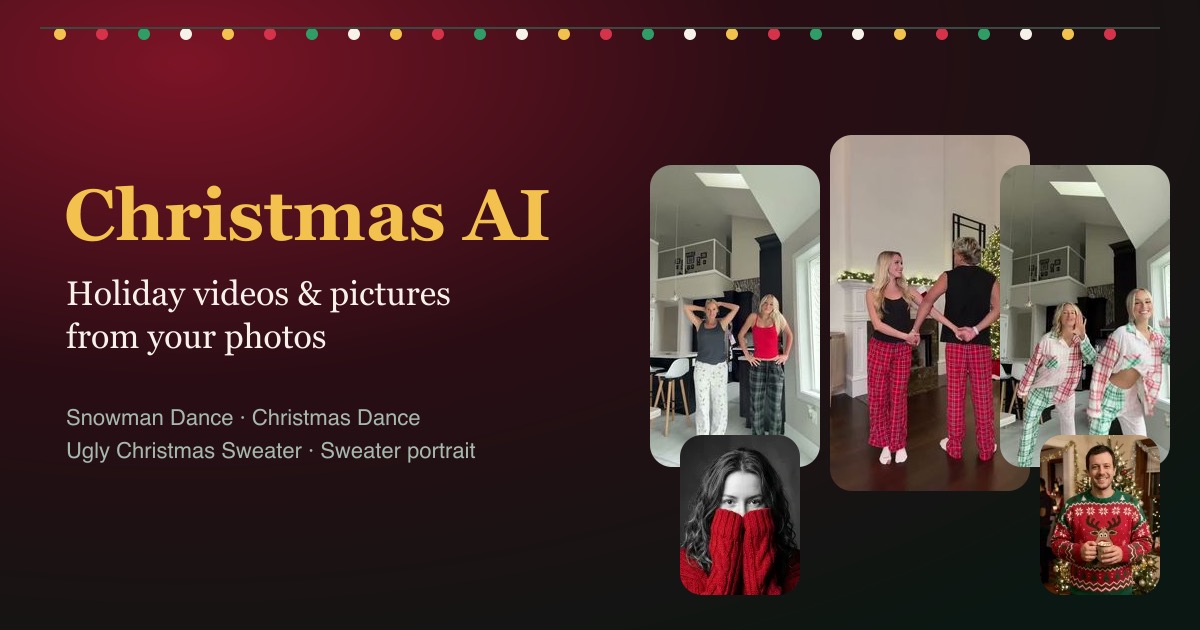
Christmas AI screenshot
ai video generator photo to video christmas tiktok trend

Christmas AI is a holiday template site that turns your photos into this season’s viral Christmas videos and pictures. Pick a template, upload one or two photos, and download the result. There is no prompt to write and no app to install.

Video Templates

Each dance template takes two photos, one per person, and returns a 12 to 14 second vertical video with the clip’s own sound:

  • Christmas Dance (14 s): two people in pajama pants dancing in sync in a bright kitchen
  • Snowman Dance (12 s): the couple dance by the fireplace and the tree, from the arch to the piggyback finish
  • All I Want for Christmas Dance (12 s): two people in patchwork plaid pajamas dance side by side, spin to swap places and finish arms up

Photo Templates

  • Ugly Christmas Sweater Generator: puts one person or a whole group at a Christmas party in a reindeer, Santa, kitten, light-up or face-knit sweater, as a 2K photo with 5 designs to pick from
  • ChatGPT Sweater Prompt: the black-and-white studio portrait where only the knit sweater has color, from one selfie, in 6 sweater colors. The page also shows the full prompt next to the picture it made

How It Works

  1. Pick a video or photo template. Each template page shows an example result first.
  2. Upload front-facing photos with one person per photo, good light and no sunglasses. JPG, PNG and WebP work.
  3. Check the credit cost on the Generate button, then generate.
  4. Download the MP4 or image and post it to TikTok, Reels, Shorts, Instagram or the family group chat.

Pricing

One-time credit packs, no subscription:

  • Single: $9.90 for 100 credits
  • Starter: $19.90 for 300 credits
  • Creator: $49.90 for 900 credits
  • Pro: $89.90 for 1,800 credits

Credits work on any template, never expire, and are refunded automatically if a result fails.

Who It’s For

  • Families making matching ugly sweater photos, or putting two relatives who live apart into one dance
  • Couples and friends posting the Snowman Dance without learning the lift
  • Office teams turning a group photo into ugly sweater avatars for Slack or the party invite
  • TikTok, Reels and Shorts creators joining holiday trends without filming
  • Small businesses posting a festive clip or team sweater photo for customers

Use photos of yourself or of people who agreed to appear. Celebrity photos are not allowed. Christmas AI is an independent tool and is not affiliated with OpenAI, Google, ByteDance (CapCut) or the songs’ rights holders.

Frequently asked questions

What is Christmas AI?

Christmas AI is an online holiday template site that turns your photos into viral Christmas content. It has 3 video templates (the Christmas Dance, the Snowman Dance and the All I Want for Christmas Dance) and 2 photo templates (an ugly Christmas sweater party photo and the black-and-white knit sweater portrait). It runs in the browser with no prompt to write.

How do I make a Christmas dance video with Christmas AI?

Pick one of the 3 dance templates, upload two front-facing photos with one person in each, and press Generate. The credit cost shows on the button first. Christmas AI returns a 12 to 14 second vertical MP4 with sound, ready for TikTok, Instagram Reels or YouTube Shorts.

How much does Christmas AI cost?

Christmas AI sells one-time credit packs: $9.90 for 100 credits, $19.90 for 300, $49.90 for 900 and $89.90 for 1,800. There is no subscription and no free credits for new accounts. Credits never expire, and a failed result refunds its credits automatically.

Can my whole family be in a Christmas AI video?

Each Christmas AI dance video holds two people, from one photo each, so a bigger family can make one dance per pair. To put everyone in one picture, the Ugly Christmas Sweater Generator dresses a whole group photo in matching holiday sweaters.

Is it safe to upload photos to Christmas AI?

Christmas AI strips location data from photos in the browser before upload. The photo is sent to its AI provider only to make your result and is deleted from the provider's storage within about 24 hours. Results stay available for 14 days, and photos are not used to train AI models. Generating requires a Google sign-in.

Does Christmas AI work on iPhone and Android?

Yes. Christmas AI runs in the web browser, so it works in Safari on iPhone and iPad, Chrome on Android and any desktop browser. There is no app to install, and videos download as MP4 files.